Please try searching something.
General Payment Flow
Overview
The general flow for issuing an order and charging your customer:
-
To issue an order, send a
POSTrequest to /orders/. Details such as items sold, their price, and currency used are sent over this request. Note thesuccess_redirect,in_progress_redirect, andfailure_redirectfields in the response. These fields specify where to redirect the customer in case of the order success, progress, or failure. Invalid request data will result in a code 400 error;Minimal request example data to issue an order:
{
    "client": {
        "email": "test@test.com"
    },
    "products": [
        {
        "price": 0.3,
        "title": "test"
        }
    ]
}
You can choose one of the following types of response to your request:
- Minimum (default value): includes general order information (type, ID, currency, amount, status, etc.), transaction details, links to check-out forms,
api_do_url; - Standard: additionally includes information about order products, client details, recurring card details, brand and website details, URL for success or failed/cancelled status, address verification service details, refund details;
- Full: see the list of fields for the full response type in the "Model" tab for
POSTendpoint to /orders/.
The number of fields in the response depends on the selected response type. To select the type of response, you must specify the query parameter (
?response_type=minimum,?response_type=standard, or?response_type=full) when creating a request. The minimum response type will be set by default if you do not specify this parameter in the request. - Minimum (default value): includes general order information (type, ID, currency, amount, status, etc.), transaction details, links to check-out forms,
-
In order to process the payment, choose one of the integration options. The customer is then redirected back to the URL specified in
success_redirect,in_progress_redirect, orfailure_redirectfields appropriately. -
Your system receives either an
order.payment_successororder.payment_failureevent through webhooks. You must wait for the webhook as that is the only wait to receive the correct payment status.
Order Status
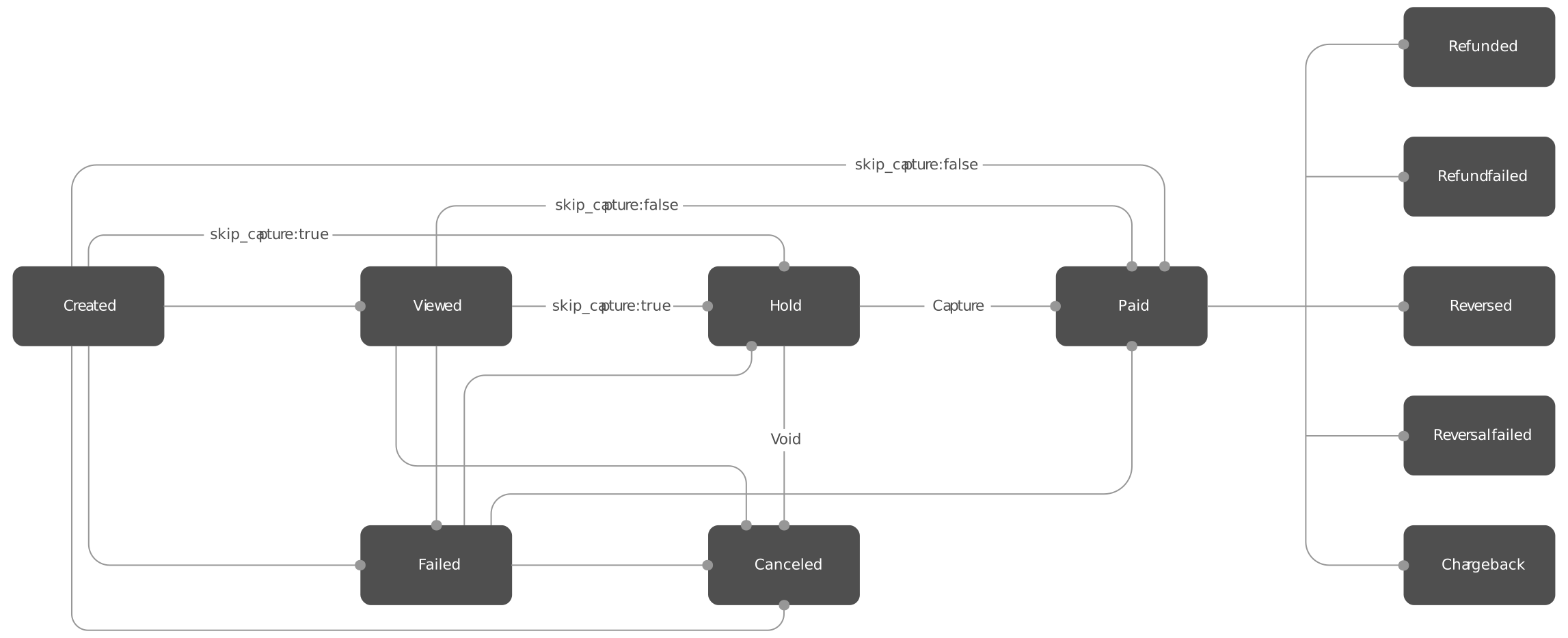
| Status | Descriptions |
|---|---|
| Paid | The order has been successfully paid for |
| Failed | The payment attempt for an order has failed. Failed is not a final status and additional payment attempts can be performed |
| Issued | The order has been issued |
| In progress | The payment attempt for an order is in progress |
| Viewed | The customer has viewed the payform |
| Hold | The customer's funds have been successfully blocked on their account. The merchant needs to capture or void this order. Will be automatically cancelled after 28 days if no action is taken |
| Overdue | The order's due date has been reached (if set), new overdue payment attempts are still allowed |
| Expired | The order's due date has been reached (if set), any overdue payment attempts will be declined. |
| Cancelled | The order has been cancelled. This is a final status and all new payment attempts will be declined. This status is assigned if (1) a merchant has requested cancelation of the order; (2) a merchant has voided the previous hold of funds; (3) a merchant uses max_payment_attempts parameter and the customer has exceeded the allowed payment attempt tries unsuccessfully |
| Rejected | A customer rejected to pay on the payform. This is a final status and all new payment attempts will be declined |
| Recieved | The order has been paid outside the gateway and the merchant has marked it as "Received" |
| Refunded | The payment for order has been refunded |
| Reversed | The payment for order has been reversed |
| Refund initiated | A refund has been initiated |
| Refund failed | A refund has been failed to process |
| Refund reversed | A refund manual cancellation has been made through the processing center |
| Reversal initiated | A reversal has been initiated |
| Reversal failed | A reversal has been failed to process |
| Chargeback | A chargeback for the payment has been received (dispute related) |
| Representation | A representation for the payment has been received (dispute related) |
| Retrieval | A retrieval for the payment has been received (dispute related) |
| Pre-arbitration | A pre-arbitration for the payment has been received (dispute related) |
| Arbitration | An arbitration for the payment has been received (dispute related) |
| Pre-compliance | A pre-compliance for the payment has been received (dispute related) |
| Compliance | A compliance for the payment has been received (dispute related) |
| Good faith | Good faith for the payment has been received (dispute related) |
| Fraud advice | A fraud advice for the payment has been received (dispute related) |
| Created | An order for payout has been created |
| Test | A test order |
Optimizing Status Checks
- Webhooks: Your system will receive a webhook notification immediately when the payment status changes. We strongly recommend waiting for the webhook to receive the correct payment status;
- Polling: If you must poll for status updates, please follow our API Best Practices to avoid rate limiting. Do not poll immediately; start with a 5-10 second delay and use increasing intervals.